WooCommerce Payment Gateway Fees: Track the Real Cost per Order (2026)
A WooCommerce order total is not the amount your store keeps. Card processors and payment gateways can deduct percentage-based charges, fixed transaction fees and, in certain situations, extra cross-border or currency-conversion costs. These amounts can make two equally priced orders contribute very different amounts to your business.
Payment fees belong in the same calculation as how to calculate real WooCommerce profit rather than in a separate, forgotten expense bucket.
This guide shows how to understand WooCommerce payment gateway fees, find the actual costs behind Stripe, PayPal and WooPayments transactions, and calculate the contribution of an order without confusing settlement payouts with profit.
Need a clearer view of order profitability? Explore Order Profit Calculator PRO to review costs and margins with the data you configure. If you also run recovery campaigns, Abandoned Cart Recovery PRO helps you build recovery workflows—but recovered revenue must still be checked against fees and direct costs.
Related reading: see our real WooCommerce profit guide.
What are payment gateway fees in WooCommerce?
A payment gateway processes or facilitates an online payment. The provider may charge your business for that service. Common costs include a percentage of the payment amount, a flat fee per successful charge, additional fees for certain card types or international payments, and currency-conversion charges where applicable.
These are merchant processing fees, not the extra fees a store might choose to show to a customer at checkout. WooCommerce order totals and gateway settlement statements also describe different things. Do not assume every processing charge is already visible as a cost line in the WooCommerce order editor.
Why does the same order amount produce different fees?
Payment provider pricing depends on your country, contract, payment method, card origin, settlement currency and other conditions. For example, an order paid with a domestic card may cost a different amount from one paid with an international card. A provider may also use a different rate for a wallet, a local method or a currency conversion.
Instead of copying a fee percentage from an online blog post, check your provider’s current pricing for your merchant account and confirm it against a real settled transaction. Relevant starting points include the official WooPayments fee documentation and the pricing or transaction records of your other gateways.
Percentage fees, fixed fees and extra charges
| Cost type | How it works | What to verify |
|---|---|---|
| Percentage | A share of the amount processed | Which amount the provider uses as its base |
| Fixed transaction fee | A set charge on each eligible transaction | Currency and whether the fee applies to refunds |
| Cross-border / international fee | An additional amount for some payment origins | Customer/card origin and your contract |
| Currency conversion | Cost associated with processing or settling another currency | Applied rate, spread and settlement currency |
| Dispute / chargeback costs | Possible costs when a payment is disputed | Actual dispute policy, outcome and fee rules |
Not every gateway applies every category. A negotiated rate or a regional payment product may have a completely different fee structure.
How to calculate an example payment processing fee
The most common illustrative model is a percentage plus a fixed amount:
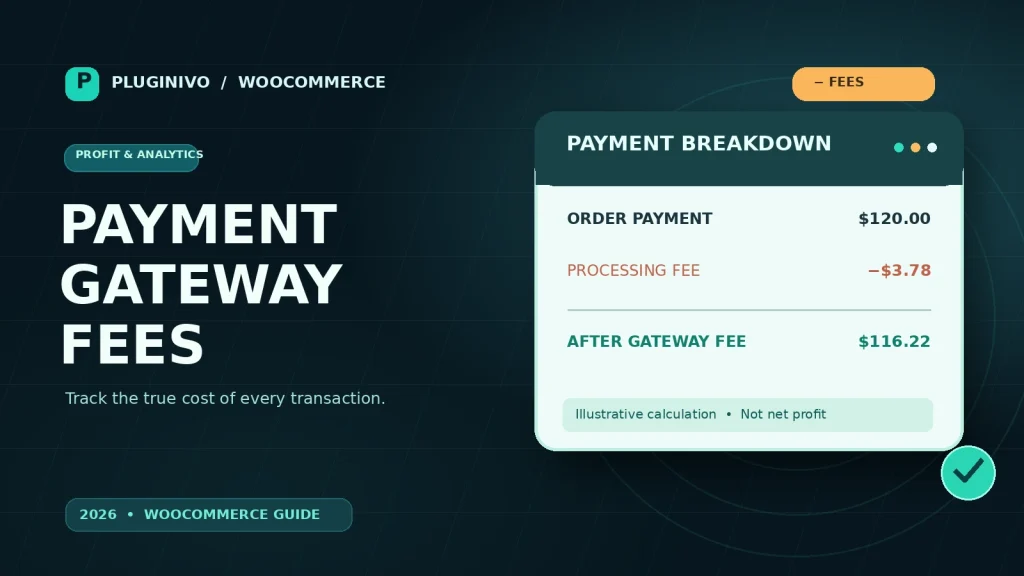
Processed payment: $120.00
Assumed rate: 2.9% + $0.30
Payment fee: ($120 × 0.029) + $0.30 = $3.78
Amount after that fee: $116.22
The $116.22 is not profit: product costs, taxes owed, packaging, fulfillment, advertising, refunds and other expenses have not all been removed. It is simply the amount left after this one example fee, before any other deductions.
From an order total to an actual contribution estimate
For decision-making, use a consistent basis. In the example below, $120 is collected from the buyer but includes $20 of sales tax that the business owes to the tax authority. The revenue base for this illustrative contribution calculation is therefore $100.
| Illustrative line | Amount |
|---|---|
| Customer payment collected | $120.00 |
| Sales tax liability (not merchant revenue) | −$20.00 |
| Revenue excluding sales tax | $100.00 |
| Cost of goods sold | −$55.00 |
| Merchant-funded shipping and packaging | −$9.00 |
| Illustrative gateway processing fee | −$3.78 |
| Contribution before marketing and overhead | $32.22 |
The distinction matters: the gateway’s percentage can be based on the amount actually charged, including tax and sometimes shipping. Your business’s revenue calculation may exclude tax collected on behalf of a government. Keep those two bases separate, and use your accountant’s treatment for tax, refunds and currency adjustments.
For a more complete view, see our WooCommerce cost of goods sold and margins. If you want to examine those cost components per order, Order Profit Calculator PRO is a relevant workflow to evaluate; verify which gateway data can be imported and which fields need manual entry in your setup.
Where to find actual gateway fees
WooPayments
In a store using WooPayments, review the transaction records in the Payments → Transactions area. WooPayments documents the charged amount and fees at the transaction level. This view covers WooPayments transactions; it is not a unified report of every third-party gateway installed on the shop. See the official transaction documentation.
Stripe
Check the payment and balance transaction details in your Stripe account, including processing fees and any applicable currency-related charges. Reconcile by transaction/payment ID and order reference rather than relying only on the amount deposited in your bank.
PayPal and other providers
Review the provider’s activity, settlement or downloadable transaction report for the exact transaction. Fees depend on the merchant plan and payment type. If the WooCommerce checkout shows only the order total, that does not prove the provider charged zero in processing costs.
A practical reconciliation process
- Choose a completed, paid order. Confirm payment status before counting revenue.
- Identify the gateway and payment transaction. Match order ID, transaction ID and currency.
- Read the actual provider fee. Use the settled transaction, not a generic fee estimate where actual data exists.
- Normalize currencies carefully. Record the exchange rate and settlement charges where conversion occurred.
- Remove taxes that are not your revenue. Avoid subtracting sales tax twice.
- Add direct order costs. Include COGS, merchant-funded shipping, packaging, discounts and other variable costs.
- Account for adjustments. Handle refunds, partial refunds and chargebacks separately from successful payments.
- Review the result. Compare contribution by payment method and across similar product groups.
What happens to gateway fees after a refund?
Do not assume that reversing the customer charge reverses every original processing fee. Refund conditions differ by provider and contract, and there may be additional costs in some situations. Stripe, for example, explains that original processing fees generally are not returned for refunded charges, with other fee details depending on pricing arrangements. Check its refund fee explanation for your case.
For partial refunds, take special care: the refund amount, tax adjustment, returned goods, shipping treatment and payment provider charges can all differ. Profit reports should not treat a refunded order as an unchanged sale.
Can you add a payment surcharge at checkout?
Some WooCommerce extensions support additional checkout charges based on the selected payment method, but technical ability does not mean the surcharge is legally permitted. Local laws, card-network rules, payment-provider terms and disclosure obligations may prohibit or limit the practice. Check those requirements before charging a customer a separate fee. A merchant processing fee and a customer-facing surcharge are different accounting events.
Five mistakes that distort WooCommerce profit reports
- Using a single flat fee for every gateway: a card payment, wallet and manual bank transfer can have different costs.
- Confusing deposits with revenue: a payout can combine many transactions, reserves and adjustments.
- Ignoring tax in the processing base: the gateway may process the tax-inclusive customer payment.
- Counting refunds as normal sales: refunded revenue and retained fees need their own treatment.
- Double-counting the same fee: be clear whether the fee is imported from a provider, entered manually or already embedded in another cost field.
Frequently asked questions
Does WooCommerce itself charge a processing fee on every order?
WooCommerce is store software; payment processing charges come from the provider and contract you use. Check the gateway you actually accept payments through.
Is a payment gateway fee the same as a WooCommerce order fee?
No. A provider’s processing fee is a merchant cost. An order fee visible at checkout may be a separate charge added to the customer’s order by store configuration or an extension.
Can I calculate gateway fees using a percentage formula?
You can use a formula for estimates, but a real settled fee is more reliable for historic profitability. Rates and extra charges are not necessarily identical on every transaction.
Should I include payment fees when pricing products?
Yes, as one of the variable costs in your pricing and margin model. Also consider taxes, COGS, fulfillment, returns and customer-acquisition costs.
What if my payment processor settles in another currency?
Use the actual settlement data and an appropriate accounting exchange rate. Keep processing fees and currency conversion differences identifiable where possible.
Make payment costs visible before scaling sales
A growing order count can hide shrinking unit economics. Track actual gateway charges, keep taxes and payout balances separate from revenue, and measure how much each order contributes after direct costs. The goal is not merely to collect more payments; it is to understand what those payments earn.
See Order Profit Calculator PRO for an order profitability workflow and Abandoned Cart Recovery PRO if you are building a cart recovery campaign that also respects contribution margins.